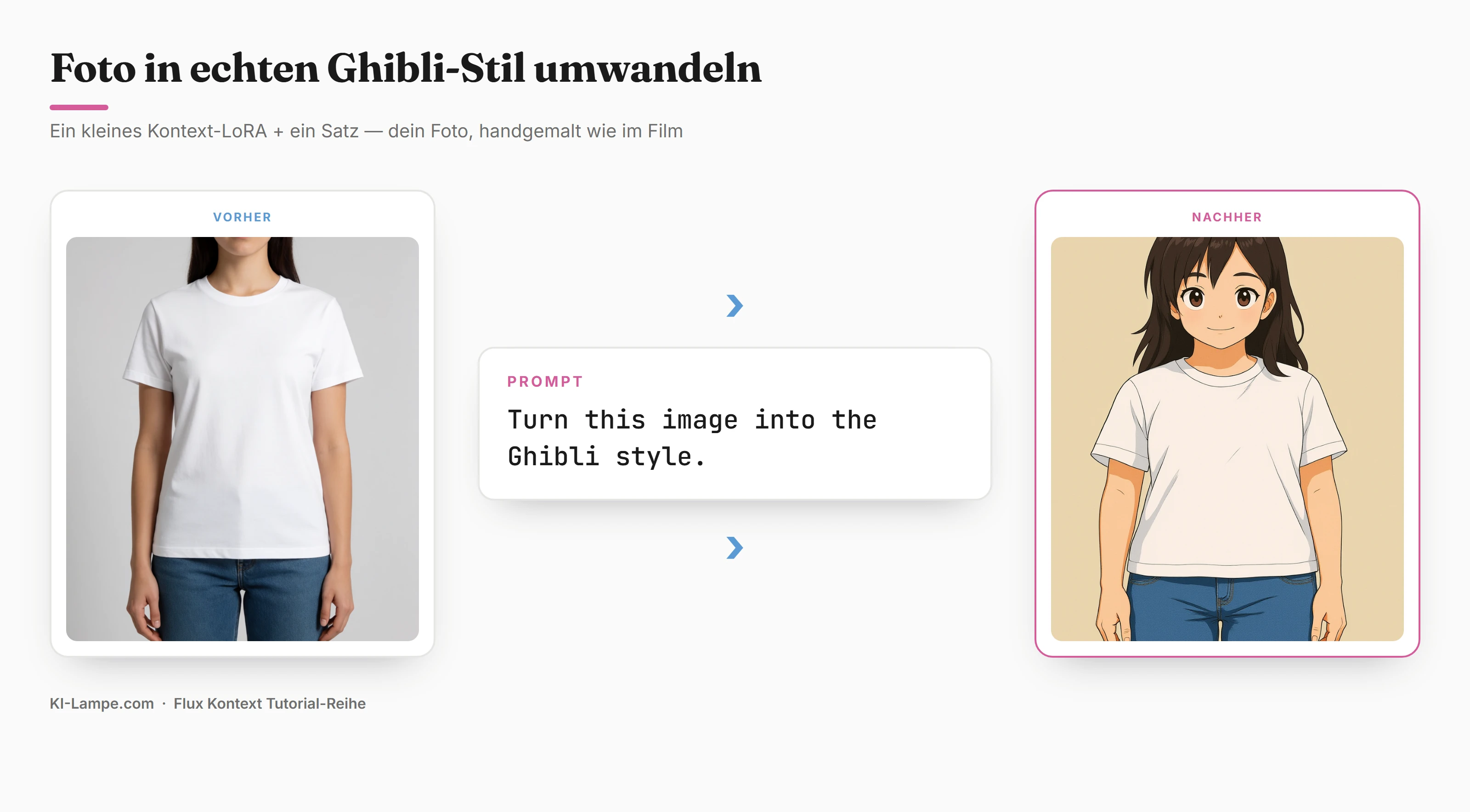
Drop your photo into one of the viral "Ghibli" generators and you get back a pretty character of someone else. Different face, different pose, often behind a subscription or a watermark.
Flux Kontext does the opposite: it repaints your photo instead of inventing a new one – face, pose and composition stay. But here's the catch almost every guide skips: the prompt "Studio Ghibli" alone gives only generic anime – glossy round eyes, no real Ghibli handwriting. The real look comes only with a small, free Kontext LoRA.
This guide shows both – the quick prompt route and the step to real Ghibli. Tested locally on an RTX 3060 with 12 GB of VRAM, free, no cloud required.
Updated: July 2026 · ComfyUI (current) · Flux.1 Kontext Dev as GGUF · LoRA
Kontext-Style/Ghibli_lora
What you'll get:
- Why Kontext keeps your subject – and why the prompt alone still isn't enough
- The free Ghibli LoRA for Kontext – and exactly where the file goes
- The full ComfyUI workflow – with the GGUF trick for 12 GB cards
- The right prompt + the tested settings (LoRA strength, guidance)
- Fine-tuning and fixes when the look drifts
Why Kontext keeps your subject
The key term is image conditioning. Kontext gets your original image not as a vague description but as a fixed reference point (the ReferenceLatent node). It applies the style change to your image – instead of rolling a brand-new picture from a text prompt.
In practice:
- Same face, same pose, same framing – only the painting style changes.
- Not a random anime character, but recognizably you (or your subject).
- You can apply the same look consistently across a whole photo series.
That's half the battle. The other half is the style itself – and that's where it gets interesting.
Why the prompt alone isn't enough
The Flux Kontext base model barely knows "Ghibli" – the studio name is trademark-thin in the training data. Ask it for "Studio Ghibli style" via prompt and you get generic anime: big glossy eyes, garish colors, but not the soft, hand-painted Ghibli handwriting.
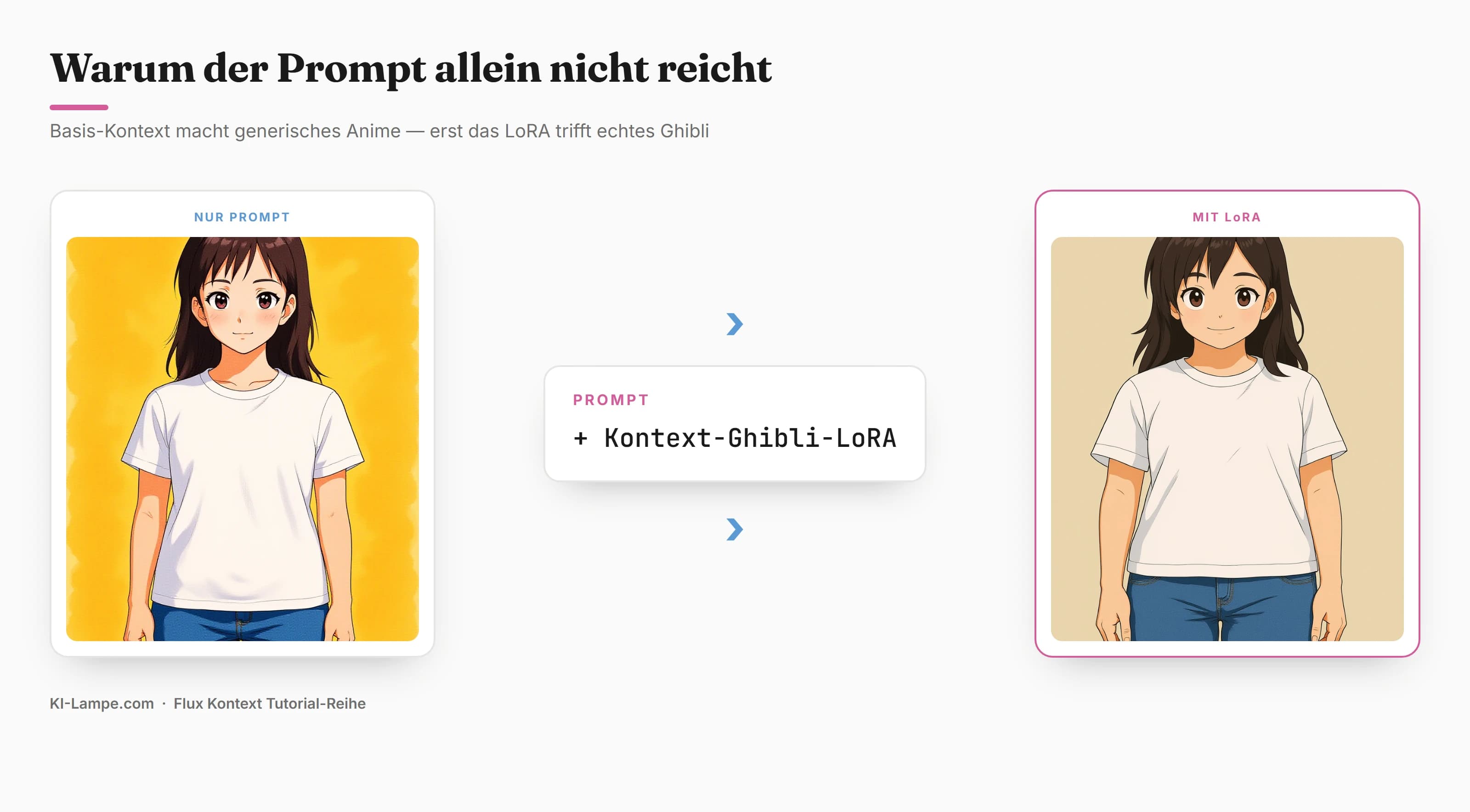
The fix is a LoRA – a small add-on file (~350 MB) that teaches the model a specific style. That's exactly what the Kontext-Style project is: a Ghibli LoRA trained specifically for Flux Kontext on paired image data. Free, local, one download – and the look lands.
🔑 Remember: Kontext provides the fidelity (your subject stays), the LoRA provides the real style. Only both together give real Ghibli instead of run-of-the-mill anime.
Requirements
| What | Recommendation |
|---|---|
| Graphics card | NVIDIA with ≥ 8 GB VRAM (tested on RTX 3060/12 GB) |
| Software | ComfyUI (current version) |
| Custom node | ComfyUI-GGUF (for the GGUF loader) |
| Storage | ~ 12 GB (base models) + ~ 350 MB (LoRA) |
💡 Tip: We use the GGUF variant of Flux Kontext (Q4_K_M, ~6.8 GB). GGUF is a compressed format – so a 12-billion-parameter model runs smoothly on a 12 GB card, where the full fp16 version (~24 GB) would be far too large.
⚠️ Warning: ComfyUI Desktop and the portable version do not share models. Put the files in the models folder of the version you actually launch.
 Empfohlenes Tool · Cloud-GPU
Keine starke Grafikkarte? Führe ComfyUI in der Cloud aus.
Flux & SDXL sind speicherhungrig. Statt ~1.800 € für eine eigene Karte mietest du bei RunPod eine 24-GB-GPU ab ca. 0,50 €/Stunde – und zahlst nur, was du nutzt.
Step 1: Install the custom node "ComfyUI-GGUF"
The GGUF loader isn't a default node – it comes via the Manager:
- Start ComfyUI → click Manager on the right.
- Open Custom Nodes Manager → search for
ComfyUI-GGUF→ Install. - Fully restart ComfyUI.
Without this step, the "Unet Loader (GGUF)" node is missing later and the workflow stays red.
Step 2: Place the models and the Ghibli LoRA
Flux Kontext has four parts (main model, two text encoders, VAE). On top comes the Ghibli LoRA – that's the part that makes the real style.
| File | Source | Folder |
|---|---|---|
flux1-kontext-dev-Q4_K_M.gguf | 🤗 QuantStack/FLUX.1-Kontext-dev-GGUF | models/unet/ |
t5xxl_fp8_e4m3fn.safetensors | 🤗 comfyanonymous/flux_text_encoders | models/text_encoders/ |
clip_l.safetensors | 🤗 comfyanonymous/flux_text_encoders | models/clip/ |
ae.safetensors | 🤗 black-forest-labs/FLUX.1-schnell (VAE) | models/vae/ |
Ghibli_lora_weights.safetensors | 🤗 Kontext-Style/Ghibli_lora | models/loras/ |
The folder structure then looks like this:
📁 ComfyUI/
└── 📁 models/
    ├── 📁 unet/
    │   └── flux1-kontext-dev-Q4_K_M.gguf
    ├── 📁 text_encoders/
    │   └── t5xxl_fp8_e4m3fn.safetensors
    ├── 📁 clip/
    │   └── clip_l.safetensors
    ├── 📁 vae/
    │   └── ae.safetensors
    └── 📁 loras/
        └── Ghibli_lora_weights.safetensors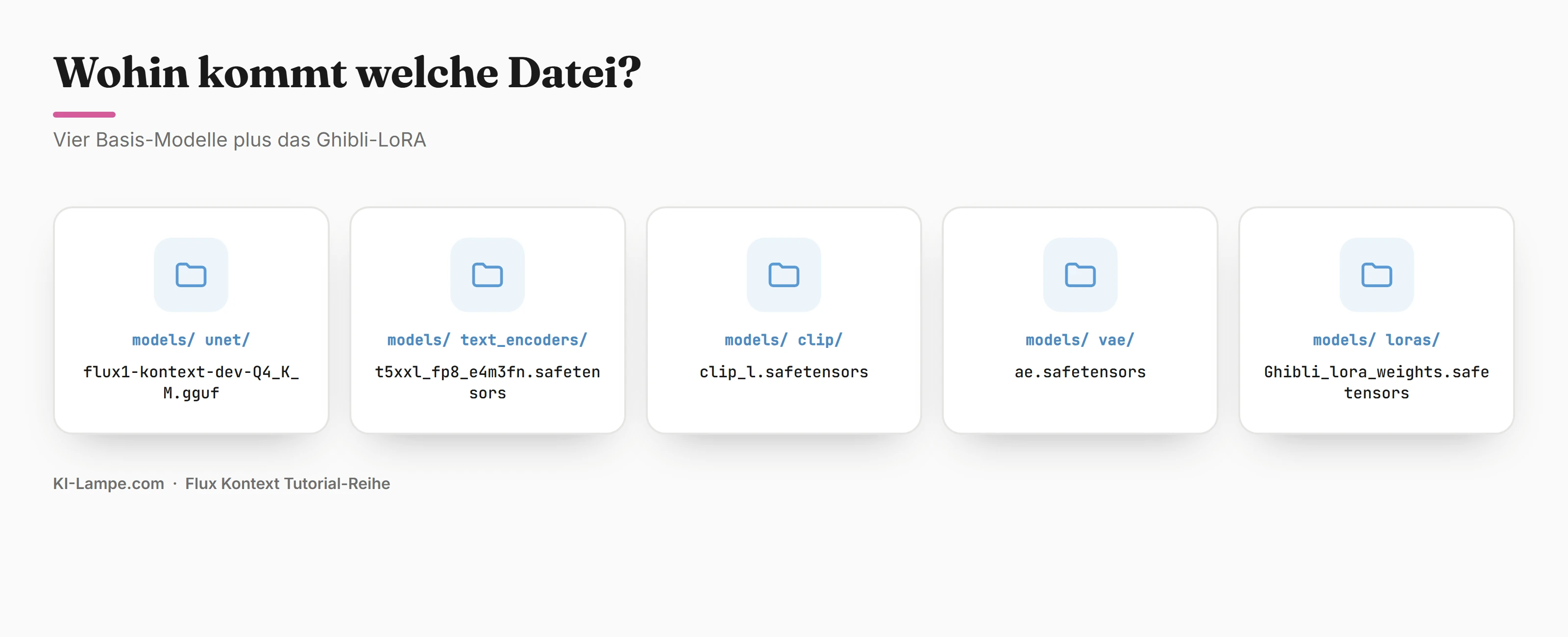
📌 Note: After copying, restart ComfyUI once, otherwise the models and LoRA won't show up in the dropdowns.
Step 3: Load the workflow – GGUF trick + hook in the LoRA
You build nothing by hand. ComfyUI ships the base workflow as a template:
- Click Workflow → Browse Templates → category Flux → "Flux.1 Kontext Dev (Basic)". The full graph loads automatically.
- GGUF trick for 12 GB cards: delete the "Load Diffusion Model" node. Right-click → Add Node → bootleg → Unet Loader (GGUF) → select
flux1-kontext-dev-Q4_K_M.gguf. - Hook in the LoRA: right-click → Add Node → loaders → LoraLoaderModelOnly. Plug the GGUF loader's MODEL output into the LoRA node, choose
Ghibli_lora_weights.safetensorsthere and setstrength_modelto 1.0. Route the LoRA node's MODEL output on to the KSampler.
Quickly check the remaining loaders:
- DualCLIPLoader →
t5xxl_fp8_e4m3fn+clip_l,type: flux - VAELoader →
ae.safetensors
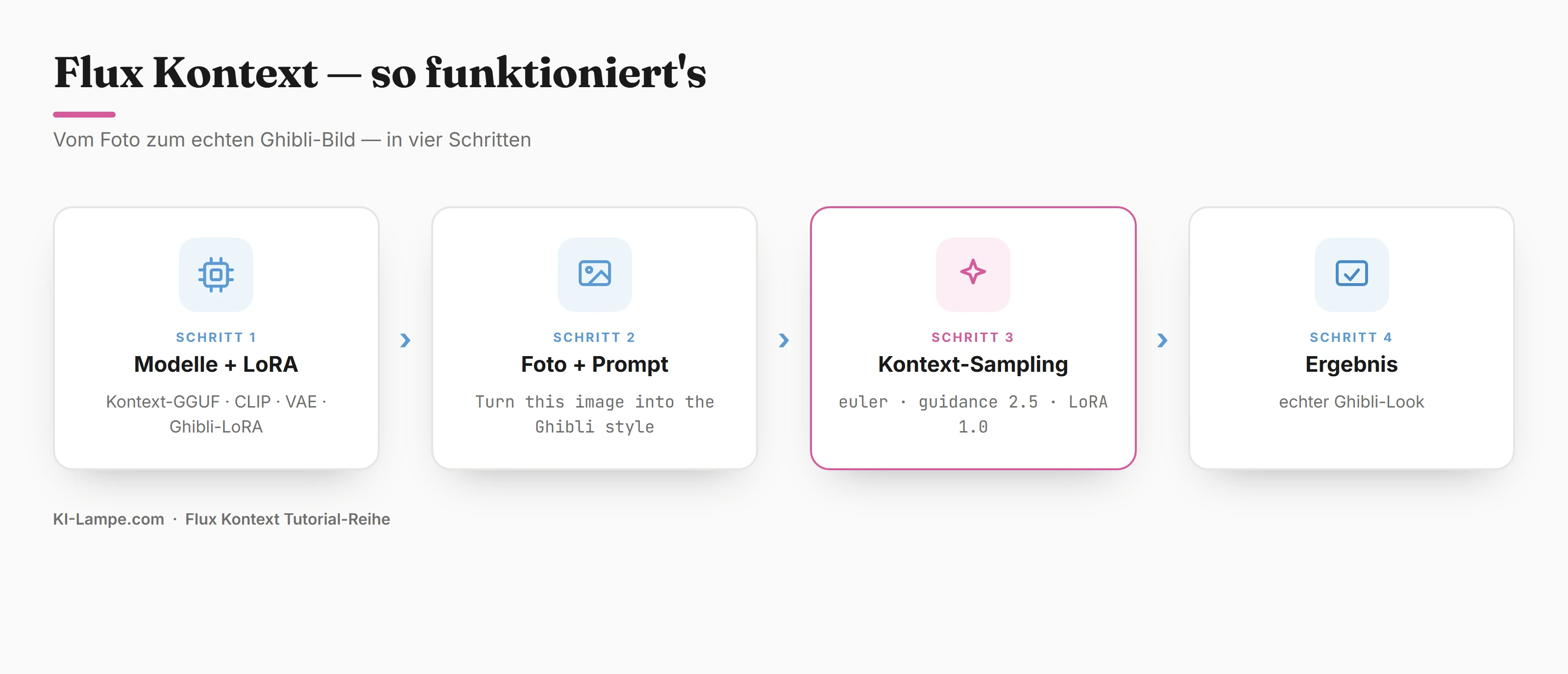
🔑 Remember: The chain is GGUF loader → LoRA loader → KSampler. The LoRA sits between model and sampler – that's the only way the Ghibli style activates.
Step 4: Load photo, write the prompt, generate
1. Load photo. Upload your source photo in the Load Image node. A clear portrait with good lighting works best.
2. Write the prompt. With the LoRA you need no prompt acrobatics – the recommended sentence is enough:
Turn this image into the Ghibli style.3. Set the parameters. The tested values:
| Parameter | Value | Why |
|---|---|---|
| Sampler | euler | stable for Flux |
| Scheduler | simple | standard for Kontext |
| Steps | 20 | clean look; 8 for a quick preview run |
| Guidance | 2.5 | Kontext standard – the LoRA does the style work |
| CFG | 1.0 | fixed for Flux |
| LoRA strength | 1.0 | full Ghibli look |
4. Generate. Click Queue Prompt.
🧪 Try it: The first run takes ~2–3 minutes because both the model and the LoRA load into VRAM. Every further conversion runs at ~30–60 seconds on the RTX 3060.
Result: your photo becomes a hand-painted Ghibli character – face, pose and clothes stay, the painting style is real Ghibli.
Fine-tuning: LoRA strength controls the look
The one dial that makes the difference is strength_model on the LoRA node:
| Strength | Effect |
|---|---|
| 1.0 | Full Ghibli look – hand-painted, soft eyes, film feel |
| 0.7–0.8 | Keeps more of the photo's realism (photo ↔ Ghibli blend) |
| 0.5 | Just a light coat – clearly a photo, with a Ghibli tone |
💡 Tip: The Kontext-Style project has not only Ghibli but a whole set of style LoRAs for Kontext (watercolor, cartoon, line-art and more). Same workflow, you just swap the LoRA file – so you build a whole style palette from one photo.
Doesn't look like Ghibli? Quick fixes
| Problem | Cause | Fix |
|---|---|---|
| Models/LoRA not in dropdown | ComfyUI not restarted | restart ComfyUI |
| "Unet Loader (GGUF)" node missing | ComfyUI-GGUF not installed | Manager → install ComfyUI-GGUF |
| Result = generic anime | LoRA not active / strength 0 | check the chain GGUF → LoRA → KSampler, set strength_model to 1.0 |
| Look too weak | LoRA strength too low | raise strength_model toward 1.0 |
| Face becomes unrecognizable | LoRA strength too high for your subject | lower to 0.8 |
| Red nodes / errors | file in the wrong folder | check folders per the table above |
No 12 GB card? Use the cloud
If your GPU won't keep up or lacks VRAM: run the exact same workflow (LoRA included) on a cloud GPU – an RTX 4090 (24 GB) from ~$0.59/h renders Kontext in seconds and with no quant compromise. The full setup is in our hub:
👉 Set up ComfyUI on RunPod (Network Volume)
Empfohlenes Tool · Cloud-GPUKeine starke Grafikkarte? Führe ComfyUI in der Cloud aus.
Flux & SDXL sind speicherhungrig. Statt ~1.800 € für eine eigene Karte mietest du bei RunPod eine 24-GB-GPU ab ca. 0,50 €/Stunde – und zahlst nur, was du nutzt.
Conclusion & next steps
Real Ghibli needs no subscription and no ChatGPT – just Flux Kontext plus a free LoRA. Kontext locks your subject in place, the LoRA brings the real style. The prompt alone only makes generic anime – the LoRA is the difference.
- 📥 Download: Get the Ghibli workflow as JSON – load it in ComfyUI via Workflow → Open, the LoRA is already wired in, drop in your photo, generate.
- 🎨 The LoRA itself: Kontext-Style/Ghibli_lora on HuggingFace (free).
- 🔗 Missing the basics? → Install Flux.1 Dev with ComfyUI
- ⏮️ From the series: Flux Kontext: Change Clothes in ComfyUI
- ⏭️ Up next: "Flux Kontext: Swap the Background" and "Flux Kontext: Change Hairstyle".
One photo, one LoRA, one sentence – and your snapshot becomes a scene that looks straight out of your favorite film.